
User Manual



http://www.3jtech.com.tw
http://www.pnpipcameras.com
G2wifiIII User’s Guide
Copyright of 3JTech Co., Ltd. (also doing business as A3J Engineering Inc.)
25
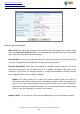
Broadcast Network Name (SSID): Enable/Disable the SSID broadcast function. This function
is used to control the broadcast status of all SSIDs. If this function is disabled, all SSIDs you
had set up for the router will be hidden. To cancel the hidden status for the specific SSID, you
can uncheck the “Hidden” option in the back of your desired SSID.
AP Isolation: Enable/Disable this function. Create a separate virtual network for your wireless
network. When this feature is enabled, each of your wireless clients will be in its own virtual
network and will not be able to communicate with each other. You may want to utilize this
feature if you have many guests that frequent your wireless network.
MBSSID AP Isolation: Enable/Disable the MBSSID AP Isolation function. The router supports
multiple SSIDs. You can decide whether the clients associated to different SSIDs on the device
can see each other or not. Enable the option to block it. Default is “Disable”.
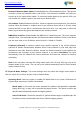
Frequency (Channel): A wireless network uses specific channels in the 2.4GHz wireless
spectrum to handle communication between clients. Some channels in your area may have
interference from other electronic devices. Choose the clearest channel to help optimize the
performance and coverage of your wireless network. If you select AutoSelect, the router
automatically finds the channel with least interference and uses that channel for wireless
networking.
Rate: Exist only when selecting 802.11b/g mixed mode, 802.11b only, 802.11g only as the
Network Mode for the router. You can set up the desired transmitting rate for these network
modes. Default is Auto.
HT Physical Mode Settings:
This mode settings exist only when 802.
11b/g/n mixed mode or
802.11n only(2.4G) is chosen as your router’s Network Mode.
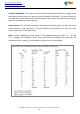
Operating Mode: Select the option to enable the Mixed Mode or the Green Field Mode for
physical layer transceivers. Default: Mixed Mode.
Mixed mode: In this mode the device transmits the packets with preamble compatible
legacy (802.11g), so they can be decoded by legacy devices. The device receives and
decodes both Mixed Mode packets and legacy packets.
Green Field mode: The device transmits HT packets without legacy compatible part. But
the device receives and decodes both Green Field and legacy packets.