
User Manual


http://www.3jtech.com.tw
http://www.pnpipcameras.com
G2wifiIII User’s Guide
Copyright of 3JTech Co., Ltd. (also doing business as A3J Engineering Inc.)
46
3.4.3 Firmware Upgrade
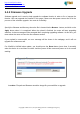
Software upgrade tool is used to help upgrade the software function in order to fix or improve the
function. User can upgrade the firmware in this page. Please note that power cannot be off in the
process of the software upgrade
. You must do it carefully.
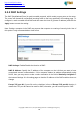
Specify the filename and directory where the file is located via the Browse…button, and click on the
Apply button when it is completed. When the upload is finished, the router will start upgrading
software. A reboot message will be prompted after completing upgrading software. At this time, you
must reboot the router to have the new software worked.
If your upload is unsuccessful, an error message will be shown in the webpage, and it will not
upgrade the software as well.
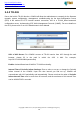
For G2wifiIII‘s NVRAM value update, you should press the Reset button (more than 2 seconds)
when the device is on and have it restart. And then power off the router and power on for its normal
working.
Location: File path and filename stored the image file you would like to upgrade.