
User Manual


http://www.3jtech.com.tw
http://www.pnpipcameras.com
G2wifiIII User’s Guide
Copyright of 3JTech Co., Ltd. (also doing business as A3J Engineering Inc.)
47
3.4.4 Configuration Management
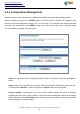
With this function, user can back up or reload the config files by exporting/ importing settings.
Besides through the press of the RESET button in the front panel to execute the hardware reset
function as we had mentioned in Section 2.2.1 for the router. The software reset function provided
here takes the same effect as the RESET button on the front panel of the router. It will take about
30~60 seconds to complete the system boot.
Export: To export the current settings stored in the flash to a config file, just press the Export
button.
Import: Import the config file into your router. Specify the filename and directory where the file
is located via the Browse…button, and press the Import button when completed.
Factory Defaults: Restoring the unit to the factory default settings will erase all settings,
including any rules that you had created. To have the router’s settings be returned to the factory
default, just press the Load Default button. Please note that the router cannot be powered off
while resetting to the factory default.