
Hardware manual

Communication profiles
34
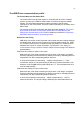
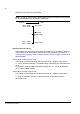
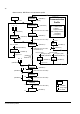
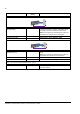
The Status Word for the ABB Drives communication profile.
The upper case boldface text refers to the states shown in State machine, ABB
Drives communication profile.
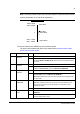
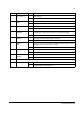
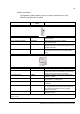
5 RAMP_HOLD 1 Enable ramp function.
Proceed to RAMP FUNCTION GENERATOR: ACCELERATOR ENABLED.
0 Halt ramping (Ramp Function Generator output held).
6RAMP_IN_
ZERO
1 Normal operation. Proceed to OPERATING.
Note: This bit is effective only if the fieldbus interface is set as the source for
this signal by drive parameters.
0 Force Ramp Function Generator input to zero.
7 RESET 0=>1 Fault reset if an active fault exists. Proceed to SWITCH-ON INHIBITED.
Note: This bit is effective only if the fieldbus interface is set as the source for
this signal by drive parameters.
0 Continue normal operation.
8 to 9 Reserved.
10 REMOTE_
CMD
1 Fieldbus control enabled.
0 Control Word <> 0 or Reference <> 0: Retain last Control Word and
Reference.
Control Word = 0 and Reference = 0: Fieldbus control enabled. Reference
and deceleration/acceleration ramp are locked.
11 EXT_CTRL_
LOC
1 Select External Control Location EXT2. Effective if control location
parameterised to be selected from fieldbus.
0 Select External Control Location EXT1. Effective if control location
parameterised to be selected from fieldbus.
12 to 15 Drive-specific (For information, see the drive documentation.)
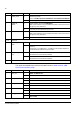
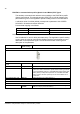
Bit Name Value STATE/Description
0RDY_ON 1READY TO SWITCH ON.
0 NOT READY TO SWITCH ON.
1 RDY_RUN 1 READY TO OPERATE.
0 OFF1 ACTIVE.
2RDY_REF 1OPERATION ENABLED.
0 Operation inhibited.
3 TRIPPED 1 FAULT.
0 No fault.
4 OFF_2_STA 1 OFF2 inactive.
0 OFF2 ACTIVE.
Bit Name Value STATE/Description