
Hardware manual


Starting up fieldbus communication and programming the ABB PLC
62
Installing the DriveStudio PC tool
Insert the DriveStudio installation CD into the CD drive of your the PC. Follow the
instructions given by the installation program.
For more information, see DriveStudio online Help folder DriveStudio: Installing and
uninstalling.
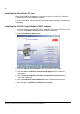
Installing the AC500 Control Builder PS501 software
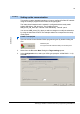
1. Insert the AC500 Control Builder PS501 installation CD into the CD drive of your
PC. Click the Read me first button and read the instructions.
2. Click the Installation PS501 button.
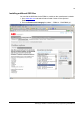
3. Click the Read me for installation button and read the instructions.
4. Click the Step 1: Installation Control Builder PS501 button. Follow the
instructions.
5. Click the Step 2: Installation Fieldbus Configuration SYCON.net button.
Follow the instructions.
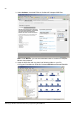
6. Click the Installation GSD and ESD files button. Follow the instructions.
7. Click the Opt. 1: Installation CoDeSys Service Tool.