
User's Manual



Part 2: USB Flash disk
2-8
Step 3. Click Cancel to copy your data to a
Hard Disk before creating your
prtition. Click OK to create your
partition. Any and all Data stored on
your Flash Disk will be
destroyed.
Switch between Protected and
Un-protected Disks
Enter the Protected Disk
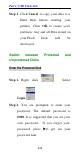
Step 1. Right click . Select
Login .
Step 2. You are prompted to enter your
password. The default password is
0000. It is suggested that you set your
own password. If you forget your
password, press uto get see your
password hint.