
User's Manual



Part 2: USB Flash disk
2-10
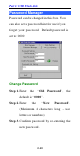
Password Manager
Password can be changed in this box. You
can also set a password hint for use if you
forget your password. Default password is
set to: 0000
Change Password
Step 1. Enter the “Old Password”, the
default is “0000”.
Step 2. Enter the “New Password”.
(Maximum 4 characters long – use
letters or numbers)
Step 3. Confirm password by re-entering the
new password.