
User's Manual
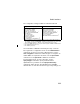
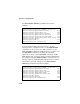
Table Of Contents
- Chapter 1 Introduction
- Chapter 2 Network Configuration
- Chapter 3 Hardware Installation
- Chapter 4 Initial Configuration
- Chapter 5 System Configuration
- Chapter 6 Command Line Interface
- Using the Command Line Interface
- Entering Commands
- Command Groups
- General Commands
- System Management Commands
- SNMP Commands
- Flash/File Commands
- RADIUS Client
- 802.1x Port Authentication
- Filtering Commands
- Interface Commands
- interface
- dns server
- ip address
- ip dhcp
- shutdown
- speed-duplex
- show interface ethernet
- radio-mode
- select-antenna-mode
- description
- ssid-broadcast
- closed-system
- speed
- channel
- ssid
- beacon-interval
- dtim-period
- fragmentation-length
- rts-threshold
- authentication
- encryption
- key
- transmit-key
- transmit-power
- max-association
- multicast-cipher
- wpa-clients
- wpa-mode
- wpa-preshared-key
- wpa-psk-type
- shutdown
- show interface wireless
- show station
- IAPP Commands
- VLAN Commands
- Appendix A Troubleshooting
- Appendix B Specifications
- Appendix C Cables and Pinouts
- Glossary
- Index

Radio Interface
5-55
The configuration settings for WPA are summarized below:
CLI Commands for WPA Pre-shared Key Security – From the
802.11g interface configuration mode, use the authentication
command to set the access point to “Open System.” Use the
WEP encryption command to enable all types of encryption. To
enable WPA to be required for all clients, use the wpa-clients
command. Use the wpa-mode command to enable the
Pre-shared Key mode. To enter a key value, use the
wpa-psk-type command to specify a hexadecimal or
alphanumeric key, and then use the wpa-preshared-key
command to define the key. Then disable 802.1x and MAC
authentication. To view the current 802.11g security settings, use
WPA pre-shared key only WPA over 802.1x
Authentication Type: Open System
WEP (encryption): Enable
1
WPA clients only: Enable
WPA Mode: Pre-shared-key
Multicast Cipher: WEP/TKIP/AES
2
WPA PSK Type -
Hex: 64 characters
ASCII: 8-63 characters
Shared Key: 64/128/152
802.1x = Disabled
3
MAC Authentication: Disabled/Local
4
Authentication Type: Open System
WEP (encryption): Enable
1
WPA clients only: Enable
WPA Mode: WPA over 802.1x
Multicast Cipher: WEP/TKIP/AES
2
Shared Key: 64/128/152
802.1x = Required
3
MAC Authentication: Disabled/Local
4
1: Although WEP keys are not needed for WPA, you must enable WEP encryption
through the web or CLI in order to enable all types of encryption in the access point.
For example, use the CLI encryption command to set Encryption = 64, 128 or 152,
thus enabling encryption (i.e., all types of encryption) in the access point.
2: Do not use WEP unless the access point must support both WPA and WEP clients.
3: See Authentication (page 5-12)
4: See Radius (page 5-9)