
User's Manual
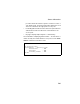
Table Of Contents
- Chapter 1 Introduction
- Chapter 2 Network Configuration
- Chapter 3 Hardware Installation
- Chapter 4 Initial Configuration
- Chapter 5 System Configuration
- Chapter 6 Command Line Interface
- Using the Command Line Interface
- Entering Commands
- Command Groups
- General Commands
- System Management Commands
- SNMP Commands
- Flash/File Commands
- RADIUS Client
- 802.1x Port Authentication
- Filtering Commands
- Interface Commands
- interface
- dns server
- ip address
- ip dhcp
- shutdown
- speed-duplex
- show interface ethernet
- radio-mode
- select-antenna-mode
- description
- ssid-broadcast
- closed-system
- speed
- channel
- ssid
- beacon-interval
- dtim-period
- fragmentation-length
- rts-threshold
- authentication
- encryption
- key
- transmit-key
- transmit-power
- max-association
- multicast-cipher
- wpa-clients
- wpa-mode
- wpa-preshared-key
- wpa-psk-type
- shutdown
- show interface wireless
- show station
- IAPP Commands
- VLAN Commands
- Appendix A Troubleshooting
- Appendix B Specifications
- Appendix C Cables and Pinouts
- Glossary
- Index

Status Information
5-61
procedure allows the wireless system to track the location of
each mobile client, and ensure that frames destined for each
client are forwarded to the appropriate access point.
• Forwarding Allowed: Shows if the station has passed 802.1x
authentication and is now allowed to forward traffic to the
access point.
• Key Type: Displays “Open System” or “Shared Key.”
CLI Commands for Displaying Station Status – To view status of
clients currently associated with the access point, use the show
station command from the Exec mode.
SMC-AP#show station 6-97
802.11g Station Table
Station Address : 00-04-E2-41-C2-9D
Authenticated : TRUE
Associated : TRUE
Forwarding Allowed : TRUE
SMC-AP#