
User's Manual
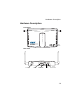
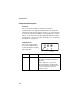
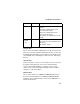
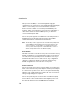
Table Of Contents
- Chapter 1 Introduction
- Chapter 2 Network Configuration
- Chapter 3 Hardware Installation
- Chapter 4 Initial Configuration
- Chapter 5 System Configuration
- Chapter 6 Command Line Interface
- Using the Command Line Interface
- Entering Commands
- Command Groups
- General Commands
- System Management Commands
- SNMP Commands
- Flash/File Commands
- RADIUS Client
- 802.1x Port Authentication
- Filtering Commands
- Interface Commands
- interface
- dns server
- ip address
- ip dhcp
- shutdown
- speed-duplex
- show interface ethernet
- radio-mode
- select-antenna-mode
- description
- ssid-broadcast
- closed-system
- speed
- channel
- ssid
- beacon-interval
- dtim-period
- fragmentation-length
- rts-threshold
- authentication
- encryption
- key
- transmit-key
- transmit-power
- max-association
- multicast-cipher
- wpa-clients
- wpa-mode
- wpa-preshared-key
- wpa-psk-type
- shutdown
- show interface wireless
- show station
- IAPP Commands
- VLAN Commands
- Appendix A Troubleshooting
- Appendix B Specifications
- Appendix C Cables and Pinouts
- Glossary
- Index

Hardware Description
1-5
Security Slot
The access point includes a Kensington security slot on the rear
panel. You can prevent unauthorized removal of the access point
by wrapping the Kensington security cable (not provided) around
an unmovable object, inserting the lock into the slot, and turning
the key.
Console Port
This port is used to connect a console device to the access point
through a serial cable. This connection is described under
“Console Port Pin Assignments” on page C-4. The console
device can be a PC or workstation running a VT-100 terminal
emulator, or a VT-100 terminal.
Ethernet Port
The access point has one 10BASE-T/100BASE-TX RJ-45 port
that can be attached directly to 10BASE-T/100BASE-TX LAN
segments. These segments must conform to the IEEE 802.3 or
802.3u specifications.
LED2 Green/Amber Off: No Ethernet Link Detected or admin
disable.
Green On: 100Mbps Ethernet Link
Detected but No Activity.
Amber On: 10Mbps Ethernet Link
Detected but No Activity.
Green Blink: 10/100Mbps Ethernet Link
Activity.
LED3
(WLAN
11g)
Green Off: Wireless Link admin Disabled.
Green On: Associated with Network but
No Activity.
Green Blink: Activity.
LED Status Description