
User's Manual




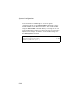
Table Of Contents
- Chapter 1 Introduction
- Chapter 2 Network Configuration
- Chapter 3 Hardware Installation
- Chapter 4 Initial Configuration
- Chapter 5 System Configuration
- Chapter 6 Command Line Interface
- Using the Command Line Interface
- Entering Commands
- Command Groups
- General Commands
- System Management Commands
- SNMP Commands
- Flash/File Commands
- RADIUS Client
- 802.1x Port Authentication
- Filtering Commands
- Interface Commands
- interface
- dns server
- ip address
- ip dhcp
- shutdown
- speed-duplex
- show interface ethernet
- radio-mode
- select-antenna-mode
- description
- ssid-broadcast
- closed-system
- speed
- channel
- ssid
- beacon-interval
- dtim-period
- fragmentation-length
- rts-threshold
- authentication
- encryption
- key
- transmit-key
- transmit-power
- max-association
- multicast-cipher
- wpa-clients
- wpa-mode
- wpa-preshared-key
- wpa-psk-type
- shutdown
- show interface wireless
- show station
- IAPP Commands
- VLAN Commands
- Appendix A Troubleshooting
- Appendix B Specifications
- Appendix C Cables and Pinouts
- Glossary
- Index

System Configuration
5-20
The user VLAN IDs must be configured on the RADIUS server for
each user authorized to access the network. If a user does not
have a configured VLAN ID, the access point assigns the user to
its own configured native VLAN ID.
When setting up VLAN IDs for each user on the RADIUS server,
be sure to use the RADIUS attributes and values as indicated in
the following table.
Note: The specific configuration of RADIUS server software is beyond
the scope of this guide. Refer to the documentation provided with
the RADIUS server software.
When VLAN filtering is enabled, the access point must also have
802.1x authentication enabled and a RADIUS server configured.
Wireless clients must also support 802.1x client software to be
assigned to a specific VLAN.
When VLAN filtering is disabled, the access point ignores the
VLAN tags on any received frames.
Local Bridge Filter – Controls wireless-to-wireless
communications between clients through the SMC2552W-G.
However, it does not affect communications between wireless
clients and the wired network.
• Disable: Allows wireless-to-wireless communications between
clients through the access point.
• Enable: Blocks wireless-to-wireless communications between
clients through the access point.
Number RADIUS Attribute Value
64 Tunnel-Type VLAN (13)
65 Tunnel-Medium-Type 802
81 Tunnel-Private-Group VLANID
(1 to 4095 in
hexadecimal)