
Specifications


31
... English
User Controls
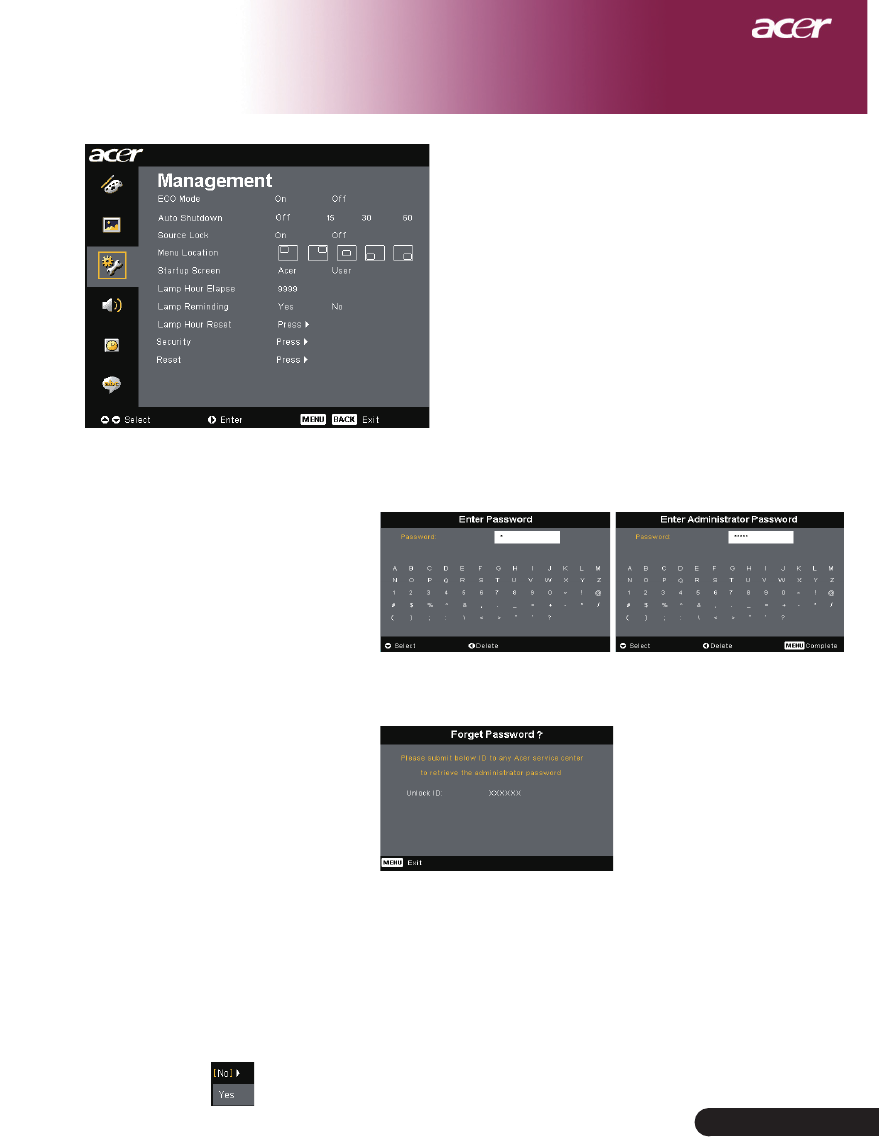
If user or administrator forgot “User Password” or
even “Administrator Password”, do the following to
retrieve the “Administrator Password”:
1.Press“MENU”formorethan4secondswhen
anyof“EnterPassword”or“EnterAdministrator
Password” dialogue is currently displayed.
2.Write down the “Unlock ID” and contact with
Acer service center. They will give you new
Administrator Password according to the Unlock
ID.
3.Once the new “Administrator Password” retrieved
fromAcerhasbeenloggedintotheprojector,old
“Administrator Password” will be replaced by the
new password.
Reset
Pressthebuttonafterchoosing“Yes”toreturnthedisplay
parameters on all menus to the factory default settings.
Management
(Computer / Video
Mode)