
Manual




11
• Date Format
• Time Totals Format
• Time of Day Format
• Day Change Offset
3. For each shift used, adjust the following items located in the Shifts and Lunches section as
desired:
o Set up shift rules
o Set up lunch rules
4. Add Employees to the Attendance Rx System.
5. Generate a Rules Setup and Employee Profile Report
After checking these reports for accuracy and making any desired changes, you may begin
entering transactions for all of your employees.
A
A
t
t
t
t
e
e
n
n
d
d
a
a
n
n
c
c
e
e
R
R
x
x
S
S
e
e
t
t
u
u
p
p
W
W
i
i
z
z
a
a
r
r
d
d
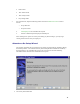
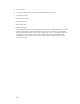
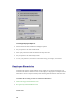
The first time Attendance Rx is executed, the user will be presented with the Attendance Rx Pay
Period Setup Wizard. The Attendance Rx Pay Period Setup Wizard establishes the initial Pay
Period settings for your Attendance Rx system. The user must enter all of the following
information before Attendance Rx will be allowed to operate.
• Current Pay Period Start Date