
Manual




13
Administrator
Employees
E
E
m
m
p
p
l
l
o
o
y
y
e
e
e
e
s
s
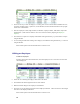
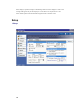
The Employees section allows you to view all of your employees and their information. You can
add a new employee, delete or modify an existing employee.
Employee How-To’s:
Adding a New Employee
Editing an Employee
Deleting an Employee
Biometrics - Enrolling an Employee Fingerprint
Please note that biometrics must be installed and enabled to use this functionality.
A
A
d
d
d
d
i
i
n
n
g
g
a
a
n
n
e
e
w
w
E
E
m
m
p
p
l
l
o
o
y
y
e
e
e
e
From the main window of Attendance Rx, click the Employees icon or enter the View menu and
select Employees.