
(software version 4.x and above) User guide





38
12. Appendix
12.1 Entering Text Using the Keyboard
The device has a full QWERTY keyboard that supports upper and
lower case Alpha characters, numbers and symbols. Press a button
that requires text input to display the keyboard. For example, press
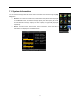
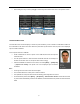
[Name] and the keyboard will appear:
To enter a name, proceed as follows:
• Press [Name] on the Add screen, as shown in figure below.
• Enter the letter characters, and a list of characters in relation to the letter is presented in the text display area.
• If the desired text is displayed in the text display area, press this text. This text is then displayed on the [Name]
button. Enter next character by repeating Step 2.
Text List Area
Text Dis
p
la
y
Area
Ke
y
board Area
Exit
Space
Character/En
g
lish
Shift Ke
y
Backs
p
ace
Ente
r