
(software version 4.x and above) User guide







3
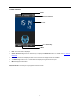
• Enter Text: Press the [Name] key. The system will automatically display the keyboard. After entering the user
name, press [X] to save and return to the previous screen.
• Modify parameters: Press the default value of a parameter and the system will automatically switch to another
value of this parameter.