
User's Guide
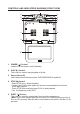
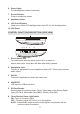
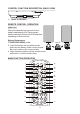

Table Of Contents

5
6. Dome Lights
Provide additional interior illumination.
7. Screen Release
Press to release the screen.
8. Ventilation holes
9. LCD Cut Off Switch
Used to turn off the LCD backlight when the LCD is in the closed position.
10. LCD Panel
CONTROL FUNCTION DESCRIPTION SIDE VIEW
1. Disc insertion Slot
For loading and removing discs. Unit must be in power on
state to load a disc. Insert disc with label side facing upwards.
2. Headphone Jack
The jack is applicable for wired headphone with a 1/8” (3.5mm) plug to listen
audio output.
3. AUX IN
The Jack is applicable for audio and video input.
4. USB PORT
USB input for USB thumb drive.
5. SD Card Reader
Allow to read the contents (Audio, Photo, Video) data on the Secure Digital
Card (SD Card), Multimedia Card (MMC), Memory Stick (MS).
6. Three Position Dome Light Switch
ON - Turns on the dome lights.
OFF - The dome lights will not turn on in this position.
AUTO - Automatically switches on the dome lights in conjunction with the
vehicle's interior illumination.
()
1
23456