
User's Guide
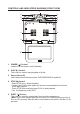
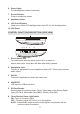
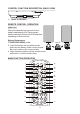

Table Of Contents

M1 M2
POWER EJECT
TV DVD
SOURCE
MUTE
DVD SOURCE VOLUME
PIX
SYSTEM MENU DISC MENU ZOOM
REPEAT
ENTER
SUBTITLE SETUPDISPLAY
AUDIO
1 2 3 4
5 6 7 8
9 0
IRT
ON/OFF
FMM
ON/OFF
1
2
3
4
5
6
7
8
9
10
11
12
13
14
15
16 17
18
19
20
21
22
23
24
25
26
27
28
29
30
6
CONTROL FUNCTION DESCRIPTION BACK
1. REAR IR SENSOR
REMOTE CONTROL OPERATION
Initial Use
When purchased the remote control has a
battery installed with a Pull Tab to prevent
battery discharge. Remove the Pull Tab before
attempting to use the remote.
Battery Replacement
1. Remove the battery holder.
2. Insert the battery into the battery holder
And insert the battery holder into the remote.
Be sure to observe the correct polarity.
3. Align the battery holder with the remote control
and push it in until the holder clicks.
MAIN FUNCTION OPERATION
( VIEW)
CR2025
1