
User's Guide
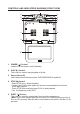
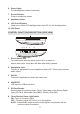
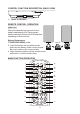

Table Of Contents
7
* Function control is available on the unit and the Remote Control.
** Function not available in this model.
1. POWER*
Press this button to turn the unit ON and OFF.
2. MONITOR SELECT
M1 Button – Set the remote control code to allow control of the unit in M1 mode.
M2 Button** – Set the remote control code to allow control of the unit in M2 mode.
3. SOURCE*
Each time the button is pressed, the unit will cycle through modes
DVD/USB/CARD, AV and AUX.
4. TV Mode Select
Switches certain function keys on the remote control for monitor functions.
5. DVD Source
This button is select key only can be active when remote control is in DVD
mode function. Each time the button is pressed one of the source DVD, Card
Reader and USB will be selected. If the Card Reader and USB not apply on
the unit, it will remain on DVD Source.
6. PIX ( Picture Select )
Each time of this button is pressed, the OSD picture adjustment displays the
“Adjustment bar” for BRIGHTNESS, CONTRAST, COLOR, TINT(For NTSC
only) or RESET. Once the desired adjustment bar is displayed, use the
VOLUME+/ –VOLUME– button to adjust the setting. The display will
automatically turn off if no adjustments are made within 6 seconds, or other
button is not pressed.
7. SYSTEM MENU
Allow the user to access the system menu. Press cursor (pq) buttons to select
desired picture control FMM screen mode, OSD language and source default during
power up.
8. CURSOR (pqtu)
Use these buttons to access menu selections on the screen.
9. ENTER
Used to implement a selected setting or menu option.