
Quick Start Guide


WCB3000QuickStartGuide
ThisQuickStartGuidewillwalkyouthroughtheeasystepstoinstallyourWCB3000
NetworkAdapter.We’llshowyouhowtoconfigureandconnecttheAdapter.
Todothis,youwillneedthefollowingitems:
• AWCB3000NetworkAdapter
• AnExternalPowerSupply(5VDC/3A;MadebyAcBel,Model:WAC010)
• Coaxialcable(s)orEthernetcable(s)
1.ConfiguretheWCB3000NetworkAdapter’sWirelessSettings
You’llneedtoconfiguretheAdapter’swirelesssettingsfirst,priortoconnecting
andinstallingitinitsfinallocation.
Step1
GetthepowersupplyfortheAdapter.Plugoneendofthepowersupplyintothe
PowerportonthebackoftheAdapter.
Step2
Plugtheotherendofthepowersupplyinanearbypoweroutlet.
Step3
GetanEthernetcable.PlugoneendintooneofthefouryellowEthernetportson
thebackoftheAdapter.PlugtheotherendintoanEthernetportonyour
computer.
Step4
Waitapproximatelyoneminute.Then,openawebbrowseronyourcomputer
andenter192.168.99.254intothebrowser’saddressbar.
Step5
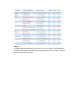
TheWirelessExtender’sconfigurationGUIsupportsthreeloginaccountswith
differentaccessrights.Theusername/passwordcombinationsare:
user/user
tech/tech
mso/mso
Thetablebelowshowstheaccessrightsforeachtypeofloginaccount: