
- FlexScan user manual color LCD panel Monitor
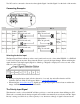
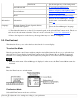
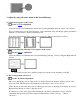
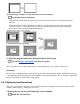

selected input, the monitor will switch the input to that signal.
In the case of only one signal being present at either input, the monitor automatically detects and displays
that signal.
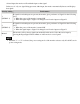
Priority setting
Performance
1
(SIGNAL 1)
If signals from both inputs are present, the monitor gives preference to Signal 1 in the following
cases.
● When the power of the monitor is turned ON.
● When the signal input to Signal 1 is changed even if active input was Signal 2.
2
(SIGNAL 2)
If signals from both inputs are present, the monitor gives preference to Signal 2 in the following
cases.
● When the power of the monitor is turned ON.
● When the signal input to Signal 2 is changed even if active input was Signal 1.
Manual
The monitor will not detect signals automatically in this mode. Select the active input by
pressing the Input Signal Selection Button on the monitor's control panel.
● When the "1" or "2" is selected, the power saving mode of the monitor activates only if both PCs are in
power saving mode.