
- FlexScan user manual color LCD panel Monitor
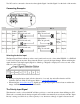
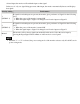
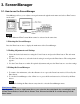
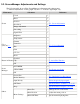
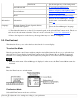
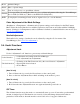
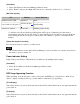

3-2. ScreenManager Adjustments and Settings
The following table shows all the ScreenManager's adjustment and setting menus.
"*" indicates adjustments of analog input only and "**" indicates digital input only.
Main menu
Sub menu
Reference
Screen
Clock
*
4-1. Screen Adjustment
Phase
*
Position
*
Resolution
*
Range Adjustment
*
Smoothing
Signal Filter
*
Color
(Custom)
* 1
Brightness
4-3. Color Adjustment
Temperature
Gamma
Saturation
Hue
Gain
6 Colors
Reset
Picture in Picture
Standard
5. ActiveShot Function
Clip
Off
Power
Manager
DVI DMPM
**
4-4. Power-save Setup
VESA DPMS
*
Off
Others
Screen Size
4-2. Displaying Low Resolutions
Border Intensity
Input Priority
Select the priority input signal.
Off Timer
Set the monitor's off timer to on or off.
Beep
Set the monitor's beeper to on or off.
Menu Settings
Menu Size
Change the size of the menu.
Menu Position
Adjust the menu position.
Menu Off Timer
Set the menu displaying time.