
- FlexScan user manual color LCD panel Monitor

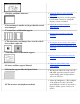

3. Display position is incorrect.
● Adjust the image position using the
<Position>.
● If the problem persists, use the graphics
board's utility software to change the
display position if available.
4. Screen image is smaller or larger than the actual
screen images.
● Adjust the resolution using the
<Resolution>.
5. Vertical bars of distortion appear.
● Decrease the vertical bars using the
<Clock>.
6. The characters and images have several vertical
bars on their right side.
● If using the monitor in the analog input
signal, try setting the gamma value from
1.8 to 2.2
7. Horizontal bars of distortion appear.
● Decrease the horizontal bars using the
<Phase>.
8. Letters and lines appear blurred.
● Adjust the blurred lines using
<Smoothing>
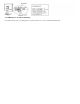
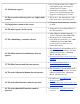
9. Distortion appears like the figure below.
● This happens when both composite (X-
OR) input signal and separate vertical
synchronizing signal are input. Please
select one of the two.
10. The screen is too bright or too dark.
● Adjust the <Brightness> (The backlight
of the LCD monitor has a fixed life
span. When the screen becomes dark or
begins to flicker, please contact your
dealer.)