
- FlexScan user manual color LCD panel Monitor




Off
Power off
*1 Directly pressing the control button without using the ActiveShot function allows you to select a
FineContrast mode. The ScreenManager Main Menu and the FineContrast Menu cannot be displayed at
the same time.
*2 These buttons are changed to Up, Left, Right, Down when using the monitor with portrait mode.
*3 Blue lighting, when the screen is displayed (Operation mode), is made to non-light, See
Power
Indicator.. Regarding the power indicator for the "Off Timer".
Rear
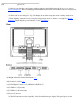
(9) Height Adjustable Stand (Detachable)* 4
(10) Security Lock Slot* 5
(11) DVI-I Input Connector x 2 (SIGNAL 1/SIGNAL 2)
(12) USB Port (1 Upstream)
(13) USB Port (2 Downstream)
(14) Power Connector
*4 The LCD monitor has the capability of the Portrait/Landscape display (The panel pivots in the