
User Guide


96
ADOBE INCOPY CS2
User Guide
See also
“File type overview” on page 100
About linked documents
A linked InCopy document is a content file (either text or graphics) within an open InDesign document or
assignment file. The content is associated with an InDesign layout, and therefore managed by the InDesign
document. The InDesign user makes this connection from within InDesign; you cannot create the link from InCopy.
The InDesign connection can be made before the InCopy user starts writing and editing text, while the writing is in
progress,orafter thetextworkisfinished. Once thecontent is linked, theInCopyusercan see(butnot change)the
page layouts, styles, and so on, as they appear in the InDesign document.
Linked documents have the following additional characteristics:
• With a linked InCopy file, you can do just about anything that concerns the text itself. For example, you can specify
text-formatting options, change fonts, and carry out other editing and copyfitting functions within the design and
formatting limits of the InDesign layout and your workflow system. You cannot, however, change the text or
graphics frames, column layout, threading sequence, or any other design elements; these are set up in InDesign.
• Linked content is managed by your workflow system, where it is locked for access control. Your system might offer
several options for opening a linked story, such as checking out each InCopy file so that you alone can work on it.
For instructions, see your workflow system documentation, ask your system administrator, or see “To check out
content (InCopy)” on page 135 if your workflow uses the InCopy LiveEdit Workflow plug-ins.
See also
“Sharing content” on page 124
“About managed files” on page 124
“Looking at a basic managed-file workflow” on page 125
Working with multistory files
When you work with linked documents, you can have more than one InCopy story in an InDesign file, depending
on your workflow system. A file with multiple stories must be created in InDesign as either an assignment file or a
file with linked InCopy content. You cannot use InCopy to create a multistory document. See your workflow system
documentation for details.
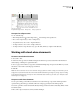
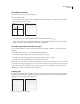
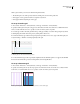
Multiple stories are shown and separated in Galley and Story views with a story separator bar. The story separator
bar provides easy access to each story created within an InDesign document.
The story separator bar contains the story title and an Expand and Collapse button which enables you to show or
hide each story. When a story is collapsed, the text is hidden and the story separator bar remains visible within the
edit pane.