
User Guide


ADOBE INCOPY CS2
User Guide
102
You can create grids within InCopy. But, because InDesign grids override InCopy settings when files are linked, this
feature is more useful for stand-alone documents that you publish directly from InCopy.
These grids and guides are never visible on printed or exported output. One set of rulers and grids exists per page,
but a guide can exist across all pages of a spread or within only a single page.
Note: Grids, rulers, and guides are not available in Galley or Story views.
About measurement units and rulers
InCopyincludesaverticaldepthrulerforcopyfittingtextinGalleyandStoryviews,aswellashorizontalandvertical
rulers in Layout view for measuring layouts. By default, rulers begin measuring from the upper-left corner of a page
or spread. You can change this by moving the zero point. (See “To modify the zero point” on page 104.)
You can work with several standard measurement units, and change these settings at any time and temporarily
override the current measurement units as you enter a value. Changing the measurement units doesn’t move guides,
grids, and objects, so when ruler tick marks change, they might not line up with objects aligned to the old tick marks.
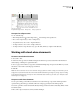
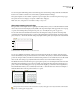
Rulers
A. Labeled tick marks B. Major tick marks C. Minor tick marks
You can set up different measurement systems for horizontal and vertical rulers. For example, many newspapers
measure horizontal layouts in picas and vertical text stories in inches. The system you select for the horizontal ruler
governs tabs, margins, indents, and other measurements. Each spread has its own vertical ruler; however, all vertical
rulers use the same settings you specify in the Units & Increments section of the Preferences dialog box.
The default unit of measure for the rulers is picas (a pica equals 12 points). You can change the ruler units and control
where the major tick marks appear on a ruler. For example, if you change the ruler unit for the vertical ruler to 12
points, a major ruler increment appears every 12 points (if such a display is possible in the current magnification).
The tick mark labels include your customized major tick marks, so when the ruler reads 3 in the same example, it
marks the third instance of the 12-point increment, or 36 points.
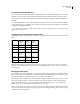
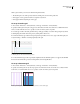
Vertical ruler using inches (left), and custom 12-point increments (right)
Settingcustomrulerincrementsintheverticalrulerisusefulforlininguparuler’smajortickmarkswithabaseline
grid. (See “Creating grids” on page 104.)
A
B
C