
User Guide


105
ADOBE INCOPY CS2
User Guide
When a grid is visible, you can observe the following characteristics:
• The baseline grid covers entire spreads, but the document grid covers the entire pasteboard.
• Grids appear on every spread and cannot be assigned to any master.
• Grids appear behind everything else on the page.
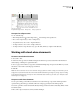
To set up a baseline grid
1 Choose Edit > Preferences > Grids (Windows) or InCopy > Preferences > Grids (Mac OS).
2 Specify a baseline grid color by choosing a preset color in the Color menu. You can also choose Other in the Color
menu, or double-click the color box to specify a custom color in the system color picker.
3 ForStart,typeavaluetooffsetthe grid from thetop of thepage, usuallytoaccountfor thetop margin. If youhave
trouble aligning the vertical ruler to this grid, try starting with a value of zero.
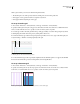
4 For Increment Every, type a value for the spacing between grid lines. In most cases, type a value that equals your
body text leading, so that lines of text align perfectly to this grid.
A
B
Grids
A. Baseline grid start B. Increment between grid lines
5 For View Threshold, type a value to specify the magnification below which the grid does not appear, and click OK.
Increase the view threshold to prevent crowded grid lines at lower magnifications.
To set up a document grid
1 Choose Edit > Preferences > Grids (Windows) or InCopy > Preferences > Grids (Mac OS).
2 Specify a document grid color by choosing a preset color in the Color menu. You can also choose Custom in the
Color menu, or double-click the color box to specify a custom color in the system color picker.
Baseline grid at magnification below view threshold (left) and above view threshold (right)