
User Guide

114
ADOBE INCOPY CS2
User Guide
When PNG files are imported, the settings in the Import Options dialog box are always based on the selected file,
not on the default or last-used settings.
Acrobat (.pdf ) import options
InCopy preserves the layout, graphics, and typography in a placed PDF file. As with other placed graphics, you
cannot edit a placed PDF page within InCopy. You can control the visibility of layers in a layered PDF file. You can
also place more than one page of a multipage PDF, by specifying one page at a time.
When you place a PDF file that was saved with passwords, you’ll be prompted to enter the required passwords. If the
PDF file was saved with usage restrictions (for example, no editing or printing), but no passwords, you can place the
file.
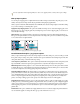
When you place a PDF file (or a file saved with Illustrator 9.0 or later) and select Show Import Options in the Place
dialog box, you’ll see a dialog box containing the following options:
Show preview Preview a page in the PDF file before you place it. If you are placing a page from a PDF file that
contains multiple pages, click the arrows, or type a page number under the preview image to preview a specific page.
Pages Specify the pages you want to place: the page displayed in the preview, all pages, or a range of pages.
Crop to Specify how much of the PDF page to place:
• Bounding box Places the PDF page’s bounding box, or the minimum area that encloses the objects on the page,
including page marks.
• Art Places the PDF only in the area defined by a rectangle that the author created as a placeable artwork (for
example, clip art).
• Crop Places the PDF only in the area that is displayed or printed by Adobe Acrobat.
• Trim Identifies the place where the final produced page will be physically cut in the production process, if trim
marks are present.
• Bleed Places only theareathatrepresentswhere allpagecontent should be clipped, if ableed area is present. This
information is useful if the page is being output in a production environment. Note that the printed page may include
page marks that fall outside the bleed area.
• Media Places the area that represents the physical paper size of the original PDF document (for example, the
dimensions of an A4 sheet of paper), including page marks.