
User Guide

128
ADOBE INCOPY CS2
User Guide
About assignment files
In InDesign, assignment files are used as containers for organizing collections of page items. For example, you might
want to select all the items in a story (headline, byline, copy, graphics, and captions), and then assign them to one
InCopy user. Adding those items to an assignment provides a convenient way for InCopy users to access just the
content for which they are responsible. Assignment files use the extension .inca, which appears in the file system, in
the InCopy story bar, and in status messages. Only InDesign users can create assignment files; only InCopy users can
open them.
Assignment files include the following:
• Links or pointers to the associated page items, including placeholder frames. This lets the InCopy user open a
single file in InCopy and have editorial access to multiple page items.
• Any transformations on the graphics included in the assignment, such as moving, scaling, rotating, or shearing.
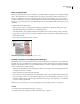
• Page geometry, so InCopy users can see the layout of the frame whose content they are editing without opening
the entire InDesign file.
• Color-coding of assigned frames in the document.
Illustration of a page in InCopy showing page geometry and color coding.
Creating assignments and adding content (InDesign)
Only InDesign users can create assignments and add content to them. There are several ways to create assignments.
The method you choose usually depends on whether you have content to add at the time you create the assignment.
Regardless of the method you choose, be sure to think through how you want to organize the assignments and their
content, and then develop a folder hierarchy.
• Create empty assignment files. From your InDesign document, you can create a series of empty assignments to act
as templates for content to come later.
• Create assignments and add content at the same time.
• Add content to an existing assignment file. You can add linked content—text and graphics that have already been
exported as InCopy content—or you can add selected page items to become linked InCopy content. If one or more
of the selected frames already contain InCopy content files and none are part of an assignment, you can add them
to a new or existing assignment file.
Note: If you do not want InCopy users to place and fit graphics, do not add graphics frames to an assignment.
See also
“To recreate missing assignment files (InDesign)” on page 133
“To simultaneously create assignments and add content (InDesign)” on page 129