
User Guide


140
ADOBE INCOPY CS2
User Guide
• To save acopyofthe currentlyactiveInCopycontent file,chooseFile > Save ContentCopy. Youcan choose to give
the copy a new name and location. The saved copy is not managed in the workflow. The Save Content Copy
command is available only if you have opened the InCopy content file (.incx) directly.
• To save all currently open and checked-out InCopy content files, choose File > Save All Content. This saves all files
to their current locations. The Save All Content command is available only if you have opened an assignment or
InDesign file.
Note: The Save a Version command is available only if you are working with a file managed by a Version Cue Workspace.
The Version Cue Workspace feature is available as part of Adobe Creative Suite.
Updating content
To make sure that you’re always working on the most up-to-date content, be sure to watch for Out of Date icons in
the Assignments palette, and then update content accordingly. Updating an InCopy assignment file and its contents
or updating individual contentfiles copies data from thelatestfilesystemcopysothatthe versiondisplayed on your
computer matches the one on the file system. Updating does not require checking in or out and does not give you
editing rights. However, updating can cause problems if another user has deleted your lock.
A typical updating workflow is as follows:
1 The InCopy user opens an assignment file or checks out an individual content file and edits the content.
2 The InCopy user saves the content file, which updates the copy on the file system, and continues working.
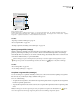
3 The InDesign user sees the Out Of Date icon in both the Assignments palette and the Links palette next to the
selection, and the In Use and Text Content Out Of Date icon or Graphics Content Out Of Date icon
on the associated frame.
Assignments palette with In Use and Out of Date icons (left) and Layout with out-of-date content (right)
4 The InDesign user updates the content.
See also
“To update the InDesign layout (InCopy)” on page 142
“Accidentally updating your work” on page 143