
User Guide

152
ADOBE INCOPY CS2
User Guide
See also
“Keys for working with text” on page 284
To view hidden characters
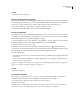
When you’re editing text, it’s often useful to see nonprinting characters, such as spaces, tabs, and paragraph symbols.
These characters are visible only in a document window; they won’t output or print.
Growth in production of custom
hand-made guitars by year
1996 1997 1998
12 36 89
Growth in production of custom
hand-made guitars by year
1996 1997 1998
12 36 89
Nonprinting characters hidden (top) and visible (bottom)
❖ Do one of the following:
• Choose Type > Show Hidden Characters. A check mark appears next to the menu command.
• Click the Show Hidden Characters button on the horizontal toolbar.
To edit text on a master page
In InDesign documents, a master page is a kind of template that applies to multiple pages. Master pages typically
specify only common layout elements that appear on all pages of the document, such as the margins, page numbers,
headers, and footers. You can use InCopy to edit the text on an InDesign master page if the text is a linked file.
However, you cannot change any of the frame attributes controlled by the master, and you cannot edit master-page
text from any other (regular) pages in the document.
Note: If you can’t click an insertion point into a nonlocked text frame on a regular page, that text might be on a master
page. Check with the person who set up the frames and with your design team.
1 Choose View > Layout View if your document is not already in Layout view.
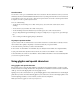
2 Choose the master page from the page box at the lower left of the document window.
Selecting the InDesign master page
3 On the master page, select the text that you want to edit, and make the changes.
To edit text on a master page, the master page must include managed stories that are checked out.