
User Guide

156
ADOBE INCOPY CS2
User Guide
See also
“Custom glyph sets” on page 155
To specify which quotation marks to use
You can specify different quotation marks for different languages. These quotation mark characters appear automat-
ically during typing if theUse Typographer’sQuotesoptionisselectedinthe Type sectionofthe Preferencesdialog
box.
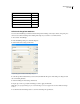
1 Choose Edit > Preferences > Dictionary (Windows) or InCopy > Preferences > Dictionary (Mac OS).
2 Choose a language dictionary from the Language menu.
3 Do one of the following:
• For Double Quotes, select a pair of quotation marks, or type the pair of characters you want to use, and click OK.
• For Single Quotes, select a pair of quotation marks, or type the pair of characters you want to use, and click OK.
To type straight quotation marks (" and ')
❖ Do one of the following:
• Deselect theUse Typographer’sQuotesoptioninthe Type sectionofthe Preferencesdialogbox,and then type the
quotationmarkorapostrophe. (Use theshortcutkeystrokesdisplayed on theInsertSpecial Charactermenutoadd
quotation marks.)
• Choose Type > Glyphs, and then insert the straight quotation mark.
• Press Shift+Ctrl+Alt+' (Windows) or Shift+Command+Option+' (Mac OS) to toggle between turning on and off
the Use Typographer’s Quotes preferences option.
To insert white space characters
A white space character is a blank space that appears between characters. You can use white-space characters for
many different purposes, such as preventing two words from being broken at the end of a line.
1 Using the Type tool, position the insertion point where you want to insert a certain amount of white space.
2 Choose Type > Insert White Space, and then select one of the spacing options (such as Em Space). (See “White
space options” on page 156.)
Representative symbols of the white-space characters appear when you choose Type > Show Hidden Characters.
White space options
The following options appear on the Type > Insert White Space menu:
Em space Equal in width to the size of the type. In 12-point type, an em space is 12 points wide.
En space One-half the width of an em space.
Flush space Adds a variable amount of space to the last line of a fully justified paragraph, useful for justifying text
in the last line. (See “To use a flush space with justified text” on page 235.)
Hair space One-twenty-fourth the width of an em space.