
User Guide


161
ADOBE INCOPY CS2
User Guide
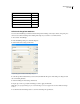
Character: Enter:
End Nested Style ^h
*Any Digit ^9
*Any Letter ^$
*Any Character ^?
* White Space (any space or tab) ^w
* Can be entered in the Find What box only
To find and change formatted text
You can use the Find/Change command to find and change text formatting, such as styles, indents, and spacing. You
cannot, however, find and change text formatting if the range of your search is set to All Documents.
1 Choose Edit > Find/Change.
2 In the Find/Change dialog box, click More Options.
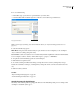
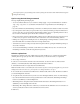
3 Under Find Format Settings, click Format.
Text formatting options available in Find/Change dialog box
4 Select the specific format attributes you want to find, and click OK. The options in the dialog box change for each
class of formatting attributes.
5 Under the Change Format Settings, click Format.
6 Repeat steps 4 and 5 to specify the formatting you want to apply, and click OK.
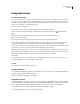
Note: When you specify formatting for your search and changes, alert icons appear above the Find What and Change
To boxes.
7 Use the Find Next and Change buttons to search for and change the specified text.