
User Guide



181
ADOBE INCOPY CS2
User Guide
3 From the Language menu, choose which language the autocorrections are applied to.
4 To correct capitalization errors (such as typing “germany” instead of “Germany”), select Autocorrect Capitali-
zation Errors. You don’t need to add the capitalized words to the list of autocorrections.
5 To add a word that you commonly misspell, click Add, type the misspelled word (such as “teh”), type the
correction (such as “the”), and then click OK.
6 Continue to add words that you commonly misspell, and then click OK.
When youtypeany misspelledwordyou addedtothe list,the word is automaticallyreplacedbythe word youentered
as the correction.
To set spelling preferences
1 Choose Edit > Preferences > Spelling (Windows) or InCopy > Preferences > Spelling (Mac OS).
2 Do any of the following:
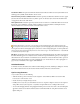
• Select Misspelled Words to find words that do not appear in the language dictionary.
• Select Repeated Words to find duplicate words such as “the the.”
• Select Uncapitalized Words to find words (such as “germany”) that appear in the dictionary only as capitalized
words (“Germany”).
• Select Uncapitalized Sentences to find uncapitalized words following periods, exclamation marks, and question
marks.
3 Select Enable Dynamic Spelling to underline potentially misspelled words while you type.
4 Specify the underline color of misspelled words (words not found in the user dictionaries), repeated words (such
as “the the”), uncapitalized words (such as “Nigeria”), and uncapitalized sentences (sentences that don’t begin with a
capital letter).
To assign a language dictionary to selected text
If you use more than one language in a stand-alone story (stories not linked to an InDesign layout), you can tell
InCopy which language dictionary to use for spell checking and hyphenating words in a particular language. You can
assign different language dictionaries to the various parts of your document down to a single character of text.
A
B
C
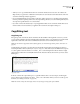
Different hyphenation breaks depending on the language dictionary
A. Glockenspiel in English B. Glockenspiel in Traditional German C. Glockenspiel in Reformed German
1 Select the text to which you want to assign a dictionary.
2 Choose Type > Character to open the Character palette.
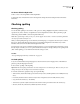
3 At thebottomofthe Characterpalette, choose adictionaryfromthe Language menu.(If theLanguagemenudoes
not appear in the Character palette, choose Customize from the Character palette menu, select Language, and click
OK.)