
User Guide

14
ADOBE INCOPY CS2
User Guide
Docked palettes
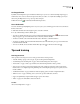
Collapsing palettes
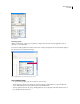
When you start InCopy, several groups of palettes are collapsed into tabs at the side of the application window
(Windows) or screen (Mac OS).
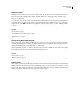
You can move collapsed palettes into windows of their own or collapse other palettes into side tabs. Palettes collapsed
into side tabs can be grouped and rearranged.
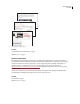
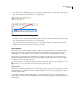
Tabs of collapsed palettes are visible at the side of the screen.
To work with palettes
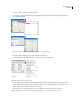
• To open a palette or palette group, choose Window > [palette name].
• To hide a palette or palette group, click the close button in the upper right (Windows) or upper left (Mac OS)
corner of the palette. Or, choose the palette name from the Window menu.
• To bring a palette to the front of its group, click the palette’s tab, choose the palette name in the Window menu, or
press the palette’s keyboard shortcut.