
User Guide

190
ADOBE INCOPY CS2
User Guide
Note: If you redefine styles in content linked to an InDesign document, the modifications are overridden when the linked
content is updated.
1 Using the Type tool , select the text formatted with the style you want to redefine.
2 Make any changes to the paragraph or character attributes as desired.
3 Choose Redefine Style in the Styles palette menu.
Next Style
You can automatically apply styles as you type text. If, for example, your document’s design calls for the style “body
text” to follow a heading style named “heading 1,” you can set the Next Style option for “heading 1” to “body text.”
After you’ve typed a paragraph styled with “heading 1,” pressing Enter or Return starts a new paragraph styled with
“body text.”
If you use the context menu when applying a style to two or more paragraphs, you can cause the parent style to be
applied to the first paragraph and the Next Style to be applied to the additional paragraphs. (See “Applying sequential
styles to multiple paragraphs” on page 193.)
To use the Next Style feature, choose a style from the Next Style menu when you’re creating or editing a style.
To base one style on another
Many document designs feature hierarchies of styles sharing certain attributes. The headings and subheads, for
example, often use the same font. You can easily create links between similar styles by creating a base, or parent,style.
When you edit the parent style, the attributes you change that appear in the child styles will change as well.
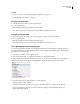
1 Create a new style or edit an existing style.
2 In theNew ParagraphStyle or NewCharacter Styledialogbox,selectthe parent styleinthe BasedOnmenu. The
new style becomes the child style.
3 Specify formatting in the new style to distinguish it from the style on which it’s based. For example, you might
want to make the font used in a subheading slightly smaller than the one used in the heading (parent) style.
If you make changes to the formatting of a child style and decide you want to start over, click Reset to Base. That
restores the child style’s formatting to be identical to the style on which it’s based. Then you can specify new
formatting. Similarly, if you change the Based On style of the child style, the child style definition is updated to match its
new parent style.
See also
“Applying sequential styles to multiple paragraphs” on page 193