
User Guide

191
ADOBE INCOPY CS2
User Guide
To delete styles
When you delete a style, you can select a different style to replace it.
1 Select the style name in the Styles palette.
2 Do one of the following:
• Choose Delete Style in the palette menu.
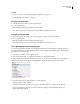
• Click the Delete icon at the bottom of the palette, or drag the style to the Delete icon.
• Right-click (Windows) or Control-click (Mac OS) the style, and then choose Delete. This method is especially
useful for deleting a style without applying it to text.
3 Select the style to replace it.
If you select [No Paragraph Style] to replace a paragraph style or [None] to replace a character style, select Preserve
Formatting to keep the formatting of text to which the style is applied. The text preserves its formatting but is no
longer associated with a style.
4 Click OK.
To delete all unused styles, choose Select All Unused in the Styles palette menu, and then click the Delete icon. When
you delete an unused style, you are not prompted to replace the style.
To convert style bullets and numbering to text
When you create a style that adds bullets or numbering to paragraphs, these bullets and numbers may be lost if the
file is opened in a previous version of InCopy or exported to a Word document. After you convert numbering to text,
you may need to update numbers manually if you edit the text.
Note: If you convert style bullets in a story linked to an InDesign layout, the style may be overridden when the content
is updated in InDesign.
1 In the Paragraph Styles palette, select the style that contains the bullets and numbering.
2 In the Paragraph Styles palette menu, choose Convert “[style]” Bullets and Numbering to Text.
If you convert bullets and numbering to text in a style on which another style is based (a parent style), the bullets and
numbering in the child style are also converted to text.
Applying styles
Applying styles
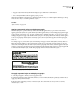
By default, applying a paragraph style won’t remove any existing character formatting or character styles applied to
part of a paragraph, although you have the option of removing existing formatting when you apply a style. A plus
sign (+) appears next to the current paragraph style in the Styles palette if the selected text uses a character or
paragraph style and also uses additional formatting that isn’t part of the applied style. Such additional formatting is
called an override.
Character styles remove or reset character attributes of existing text if those attributes are defined by the style.