
User Guide

193
ADOBE INCOPY CS2
User Guide
• To apply a style and leave the Quick Edit list displayed, press Shift+Enter or Shift+Return.
• To close the Quick Edit list without applying a style, press Esc.
When the Quick Edit list is displayed, press the left and right arrow keys to scroll through the edit field; press the up
and down arrow keys to scroll through the list of styles.
See also
“Style overrides” on page 194
Applying sequential styles to multiple paragraphs
The Next Style option specifies which style will be automatically applied when you press Enter or Return after
applying a particular style. It also specifies which styles will be applied when you select multiple paragraphs and apply
a style using the context menu. (See
“To apply sequential styles to multiple paragraphs” on page 193.) If you select
multiple paragraphs and apply a style that has a Next Style option, the style specified as the next style will be applied
to the second paragraph. If that style has a Next Style option, the next style will be applied to the third paragraph,
and so on.
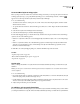
For example, suppose you have three styles for formatting a newspaper column: Title, Byline, and Body. Title uses
Byline for Next Style, Byline uses Body for Next Style, and Body uses [Same Style] for Next Style. If you select an
entire article, including the title, the author’s byline, and the paragraphs in the article, and then apply the Title style
using the context menu, the article’s first paragraph will be formatted with the Title style, the second paragraph will
be formatted with the Byline style, and all other paragraphs will be formatted with the Body style.
Before and after applying a style with Next Style.
To apply sequential styles to multiple paragraphs
1 Select the paragraphs to which you want to apply the styles.
2 In the Paragraph Styles palette, right-click (Windows) or Control-click (Mac OS) the parent style, and then choose
Apply [Style Name], Then Next Style.
If the text includes formatting overrides or character styles, the context menu also lets you remove overrides,
character styles, or both.