
User Guide

194
ADOBE INCOPY CS2
User Guide
Style overrides
When you apply a paragraph style, character styles and other previous formatting remain intact. After you apply a
style, you can override any of its settings. When formatting that is not part of a style is applied to text with that style
applied, it is called an override.Whenyou select text with an override,aplus sign (+) appearsnexttothe stylename.
In character styles, an override is displayed only if the applied attribute is part of the style. For example, if a character
style only changes text color, applying a different font size to the text does not appear as an override.
You can clear character styles and formatting overrides when you apply a style. You can also clear overrides from a
paragraph to which a style has been applied.
If a style has a plus sign (+) next to it, hold the mouse pointer over the style to view a description of the override
attributes.
See also
“To redefine a style to match selected text” on page 189
To preserve or remove overrides when applying paragraph styles
• To apply a paragraph style and preserve character styles, but remove overrides, hold down Alt (Windows) or
Option (Mac OS) as you click the name of the style in the Paragraph Styles palette.
• To apply a paragraph style and remove both character styles and overrides, hold down Alt+Shift (Windows) or
Option+Shift (Mac OS) as you click the name of the style in the Paragraph Styles palette.
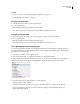
Right-click (Windows) or Control-click (Mac OS) the style in the Paragraph Styles palette, and then choose an option
from the context menu. You can then clear overrides, character styles, or both while applying the style.
To clear paragraph style overrides
1 Select the text containing the overrides.
2 In the Paragraph Styles palette, do any of the following:
• To remove paragraph and character formatting, click the Clear Overrides icon , or choose Clear Overrides
from the Paragraph Styles palette.
• To remove character overrides but preserve paragraph formatting overrides, hold down Ctrl (Windows) or
Command (Mac OS) as you click the Clear Overrides icon.
• To remove paragraph-level overrides but preserve character-level overrides, in the Paragraph Styles palette, hold
down Shift+Ctrl (Windows) or Shift+Command (Mac OS) as you click the Clear Overrides icon.
Note: When you clear overrides, paragraph-level overrides are removed from the entire paragraph, even if only part of
the paragraph is selected. Character-level overrides are removed only from the selection.
Clearing overrides does not remove character style formatting. To remove character style formatting, select the text
containing the character style, and then click [None] in the Character Styles palette.
To break the link between text and its style
When you break the link between text and its style, the text retains its current formatting. However, future changes
to that style will not be reflected in the text that was separated from the style.
1 Select the text that is marked with the style that you want to break from.
2 Choose Break Link To Style from the Styles palette menu.