
User Guide


201
ADOBE INCOPY CS2
User Guide
To apply a font
1 Using the Type tool , select the text you want to change.
2 Do one of the following:
• In the Character palette, select a font in the Font Family menu or a style in the Type Style menu. (In Mac OS, you
can select type styles in the Font Family submenus.)
• In the Character palette, click in front of the font family name or type style name (or double-click its first word),
and type in the first few characters of the name you want. As you type, InCopy displays font family or type style
names that match the characters you’ve typed.
• Choose a font in the Type > Font menu. Note that you choose both a font family and a type style when you use
this menu.
See also
“To show or hide font preview in menus” on page 201
To specify type size
1 Using the Type tool , select the text you want to change.
2 Do one of the following:
• In the Character palette, choose the desired size in the Font Size menu .
• Select the existing size and type a new value in the Font Size menu .
• Choose a size in the Type > Size menu. Choosing Other lets you type a new size in the Character palette.
• Right-click (Windows) or Control-click (Mac OS), and then choose a size in the Size menu.
You can specify any type size from 0.1 to 1296 points (the default is 12 points), in 0.001-point increments.
To show or hide font preview in menus
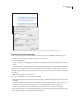
1 Choose Edit > Preferences > Type (Windows) or InCopy > Preferences > Type (Mac OS).
2 Do one of the following:
• To turn on font appearance, select Font Preview Size, and then choose a display size from the menu.
• To turn off font appearance, deselect Font Preview Size.
When selected,fontpreview displays asamplefonttothe rightofthe menu name in theType > Font menu andthe
Character palette.
About OpenType fonts
OpenType fonts may include a number of features, such as swashes and discretionary ligatures, that aren’t available
in current PostScript and TrueType fonts. In addition, OpenType fonts provide alternate glyphs for many characters,
which you can insert using the Glyphs palette. (See “To highlight alternate glyphs in the text” on page 155.)