
User Guide


202
ADOBE INCOPY CS2
User Guide
A
B
C
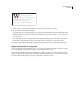
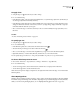
Regular (left) and OpenType (right) fonts
A. Ordinals B. Discretionary ligatures C. Swashes
Installing OpenType fonts
InCopy includes fonts from various OpenType families, including Adobe Garamond Pro, Adobe Caslon Pro, Trajan
Pro, Caflisch Script Pro, Myriad Pro, Lithos, and Adobe Jenson Pro.
OpenType fonts are installed automatically when you install InCopy. OpenType fonts are also located in the Adobe
Fonts folder in the Goodies folder on the InCopy CD. For information on installing these fonts, see the OpenType
Read Me file in the Adobe Fonts folder. For additional information on OpenType fonts, see the PDF files in the Fonts
folder, which is in the Documentation folder on the InCopy CD.
To apply OpenType font attributes
1 Select text.
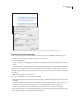
2 In the Character palette, make sure that an OpenType font is selected.
3 Choose OpenType in the Character palette menu, and then select an OpenType attribute, such as Discretionary
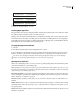
Ligatures or Fractions. Square brackets [ ] indicate that a feature is not supported by the currently selected font.
You can also select OpenType font attributes when defining a paragraph or character style. Use the OpenType
Features section of the Style Options dialog box. (See “To create styles” on page 187.)
OpenType font attributes
When you use an OpenType font for your text, you can select specific OpenType features from the Character palette
menu when formatting text or when defining styles.
Note: OpenType fonts vary greatly in the number of type styles available and the kinds of features they offer, so some of
the features listed below might not be available for a particular font. If a feature is unavailable, it will be surrounded with
square brackets [] in the Character palette menu.
Discretionary Ligatures Font designers may include optional ligatures that should not be turned on in all circum-
stances. Selecting this option allows these additional optional ligatures to be used, if they are present. For more infor-
mation on ligatures, see “Ligatures” on page 211.
Fraction Numbers separated by a slash (such as 1/2) are converted to a fraction (such as 1/2), when fractions are
available.
Ordinal Ordinal numbers (such as 1st and 2nd) are formatted with superscript letters (1st and 2nd), when ordinals
are available. Letters such as the superscript “a” and “o” in the Spanish words “segunda” (2a) and “segundo” (2o) are
also typeset properly.
Swash When they are available, regular and contextual swashes, which may include alternate caps and end-of-word
alternatives, are provided.