
User Guide



ADOBE INCOPY CS2
User Guide
209
Scaling type
You can specify the proportion between the height and width of the type, relative to the original width and height of
the characters. Unscaled characters have a value of 100%. Some type families include a true expanded font,whichis
designed with a larger horizontal spread than the plain type style. Scaling distorts the type, so it is generally preferable
to use a font that is designed as condensed or expanded, if one is available.
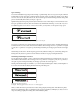
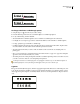
Scaling type
A. Plain type, not scaled B. Condensed type, not scaled C. Condensed type, scaled
To adjust vertical or horizontal scaling
1 Select text you want to scale.
2 In the Character palette, type a numeric value to change the percentage of Vertical Scaling or Horizontal
Scaling .
To apply baseline shift
Use Baseline Shift to move a selected character up or down relative to the baseline of the surrounding text. This
option is especially useful when you’re hand-setting fractions or adjusting the position of inline graphics.
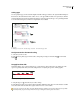
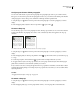
Baseline shift values applied to a picture font
1 Using the Type tool , select the text you want to change.
2 In the Character palette, type a numeric value for Baseline Shift . Positive values move the character’s baseline
above the baseline of the rest of the line; negative values move it below the baseline.
To increase or decrease the value, click in the Baseline Shift box, and then press the Up or Down Arrow key. Hold
down Shift while you press the Up or Down Arrow key to change the value in greater increments.
A
B
C
-6 -2 0