
User Guide



215
ADOBE INCOPY CS2
User Guide
To adjust space above or below paragraphs
You can control the amount of space between paragraphs. If a paragraph begins at the top of a column or frame,
InCopy does not insert extra space before the paragraph. In such a case, you can increase the leading of the first line
of the paragraph, or increase the top inset of the frame in InDesign, and then update the file.
1 Using the Type tool , click an insertion point in the desired paragraph or select the paragraphs you want to
change.
2 In the Paragraph palette, adjust the values for Space Before or Space After .
To create a drop cap
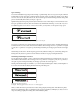
You can add drop caps to one or more paragraphs at a time. The drop cap’s baseline sits one or more lines below the
baseline of the first line of a paragraph. You can also create a character style that can be applied to the drop-cap
characters.
A
fter breakfast I wa
n
breakfas
t
man and guess out guess ou
t
After
but Jim didn’t wan
t
bad luck; and besides, h
e
ha’nt us; he said a man t
h
likely to go a-ha'nting
a
planted and comforta
b
reasonable, so I didn’t s
a
want to. He said it would f
e
come and ha'nt us; he sai
d
to go a-ha'nting around t
h
That sounded pretty re
a
couldn't keep from study
i
the man, and what they
d
One-character, three-line drop cap (left) and five-character, two-line drop cap (right)
1 Using the Type tool , click an insertion point in the desired paragraph or select the paragraphs you want to
change.
2 In the Paragraph palette, for the Drop Cap Number of Lines , type the number of lines you want the drop cap
to occupy.
3 For the Drop Cap One or More Characters , type the number of enlarged characters you want.
4 To apply a character style to the drop-cap character, choose Drop Caps and Nested Styles from the Paragraph
palette menu, and then choose the character style that you’ve created.
5 If you want to resize, skew, or change the typeface of the drop-cap letter for added effect, select the letter or letters
and make the formatting changes. For example, if your drop-cap letter has a descender, you can use baseline shift to
adjust the placement.
See also
“To apply a character style to a drop cap” on page 195
To remove a drop cap
1 Using the Type tool , click an insertion point in the desired paragraph or select the paragraphs you want to
change.
2 In the Paragraph palette, type 0 for Drop Cap Number of Lines, or for Drop Cap One or More Characters.