
User Guide

226
ADOBE INCOPY CS2
User Guide
To move a tab setting
1 Click an insertion point in the paragraph.
2 In the Tabs palette, select a tab on the tab ruler.
3 Do one of the following:
• Type a new location for X, and press Enter or Return.
• Drag the tab to a new location.
To delete a tab setting
1 Click an insertion point in the paragraph.
2 In the Tabs palette, drag the tab off the tab ruler.
To change a tab from one alignment to another
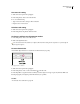
1 In the Tabs palette, select a tab on the tab ruler.
2 Click a tab-alignment button.
You can also hold down Alt (Windows) or Option (Mac OS) while clicking the tab stop marker to cycle through the
four alignment options.
To create decimal tabs
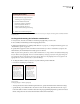
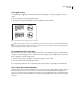
A decimal tab aligns characters on a decimal or another character you specify.
Lines aligned on the x character
1 Click an insertion point in the paragraph.
2 In the Tabs palette, create or select a decimal tab on the tab ruler.
3 In the Align On box, type the character to which you want to align. You can type or paste any character. Make sure
that the paragraphs you’re aligning contain the character you specified.
See also
“To insert tabs into a table cell” on page 248