
User Manual




3.2.1.2 DHCP Server
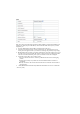
1. Press “More>>”, for more settings.
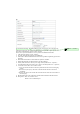
2. DHCP Server: Choose either Disable or Enable.
3. IP Pool Starting/Ending Address: Whenever there is a request, the DHCP server will
automatically allocate an unused IP address from the IP address pool to the requesting computer.
You must specify the starting / ending address of the IP address pool.
4. Lease Time: DHCP lease time to the DHCP client.
5. Domain Name: Optional, this information will be passed to the client
6. Primary DNS/Secondary DNS: Optional, This feature allows you to assign a DNS Servers
7. Primary WINS/Secondary WINS: Optional, this feature allows you to assign a WINS Servers
8. Gateway: Optional, Gateway Address would be the IP address of an alternate Gateway.
This function enables you to assign another gateway to your PC, when DHCP server offers an IP
to your PC.
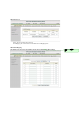
9. Clients List...: Reference the next Page “DHCP Clients List”.
10. Fixed Mapping...: Reference the next page “DHCP Fixed Mapping”.
After you finish your selection then
Either Click on “Save” to store what you just pick or click “Undo” to give up
註解 [09]: 應改為
Press… for more….
註解 [010]: 應該為
Refer to…….
註解 [011]: 應該為
Refer to….
註解 [012]: 應該為
After…, then……