
Instruction manual


Maximum Series Portable Chiller : Air & Water-Cooled : M1 Series Instrument
Page: 34
ADVANTAGE ENGINEERING, INC.
525 East Stop 18 Road Greenwood, Indiana 46142
317-887-0729 Fax: 317-881-1277
Service Department Fax: 317-885-8683
Email: service@AdvantageEngineering.com
on, the control has a 15 second buffer for the low pressure
fault.Ifalowpressureconditionoccurswithintherst15
seconds,thecontrolwaitstheamountoftimespecied
by the “LP TIME” potentiometer before indicating an fault
and turning off the compressor. If the condition is corrected
before the time expires, no fault occurs. If a low pressure
condition occurs 15 seconds after the compressor turns on,
the instrument waits 20 seconds before indicating a fault
and turning off the compressor.
Note: refer to section 4.4 of this manual for additional Low
Refrigerant Pressure troubleshooting.
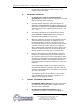
E. TEMPERATURE DISPLAY
1. A three digit display window indicates the appropriate
temperature. The window also displays the numeric value
for the setpoint temperature.
2. The To Process temperature is always displayed unless
a button has been pressed. If there is a probe error, the
display will show three dashes “---”.
3. When the water temperature in the chiller is above
approximately 100°F the display will show three
dashes “---”.
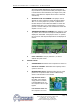
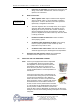
F. PRESSURE GAUGES
1. PROCESS PRESSURE GAUGE: Indicates process pump
pressure.
2. REFRIGERANT HEAD PRESSURE GAUGE: Indicates
refrigerant pressure on the discharge side of the
compressor. The refrigerant head pressure is also the
condensing pressure which is critical to equipment
efciency.
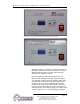
Pressure
gauges
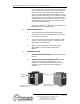
M1D-15AF 15 ton air-cooled porta-
ble chiller shown.
M1D-10A 10 ton air-cooled
portable chiller shown.
Pressure gauges