
User manual



5 TPC-31/61 User Manual
Chapter 1 General Information
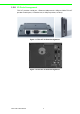
1.3 Panel Mounting
There is an adhesive waterproof gasket on the front bezel. Make sure the waterproof
gasket is in position before installing a TPC-31/61 panel computer into the panel
opening.
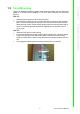
TPC-31T:
1. Install the panel computer into the panel opening.
2. Find the mount bracket, four short screws and four long screws in the accessory
pack. Fix the mount bracket on the rear cover with four short screws and then
fasten the long screws. These screws will then push the mounting panel and fix
the unit. The mounting panel thickness is suggested to be less than 3.5 mm
(0.137 inch).
TPC-61T:
1. Install the TPC into the panel opening.
2. Find the six clamps and six long screws in the accessory pack. Hook the clamps
to the holes around the four sides of the bezel. Insert the screws into every
clamp and fasten them. These screws will push the mounting panel and fix the
unit.
3. The suggested mounting panel thickness is less than 6 mm (0.236”).
Figure 1.3 Panel Mounting