
Programming instructions


Recording Measurement Results Applications
Agilent 8163A/B, 8164A/B & 8166A/B Mainframes, Sixth Edition 283
Recording Measurement Results
Printing Application Measurement Results
You can print application measurement results by completing the following
instructions.
1 Perform any of the following applications as described above:
• “The Logging Application” on page 242,
• “The Stability Application” on page 254, or
• “The PACT Application” on page 266.
2 Move to the Analysis Screen.
3 Connect your printer to the instrument as described in “How to Connect a
Printer” on page 81.
4 Select the printer type as described in “How to Select the Printer Type” on
page 75.
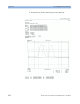
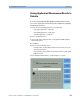
5 Press [Menu], move to <Print>, and press Enter. The screen, shown in
Figure 175 , appears.
Figure 175 The Printing in Progress Screen
If you want to cancel the print job, press the [Cancel] softkey.
NOTE