
User`s guide




Making a Return Loss Measurement Getting Started with Return Loss
Agilent 81610A/11A/12A/13A/14A Return Loss Module, Fifth Edition 25
Termination Calibration
Use this procedure to calibrate the Return Loss module against a
terminated cable, that is when there are no reflections returning from
its end.
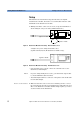
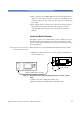
1 Making sure all the connectors are clean, set up the instrument as
shown in Figure 14
Figure 14 Termination Calibration - External source
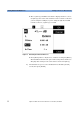
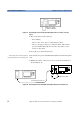
or Figure 15 if you are using an internal source
(Agilent 81611A/2A/3A/4A Return Loss modules only).
Figure 15 Termination Calibration - Internal Source
NOTE If you are using a Fabry-Perot source, you must fix its output cable
to ensure minimum cable movement.
2 Terminate the cable so that there are no reflections coming from the
end.
TIP You can do this by wrapping the fiber five times around the shaft of
a screwdriver(or some similar object with a diameter of between
5mm and 7mm).
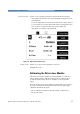
3 Press [Menu] to access the menu.
4 Move to <Terminated calibration> and press [Enter]. The
instrument measures the power reflected by the cable, and sets the
[Para] values used by the Return Loss monitor’s power sensor and
monitor diode.
TIP An alternative steps 3 and 4 is to select the Return Loss module’s
[Details] screen, then press [TermCal].
Termination
8161x 8163A Lightwave MultimeterLaser
Source
Agilent 81113PC
Agilent 81113PC
8161x
8163A Lightwave Multimeter
Termination
Agilent 81113PC