
User`s guide




Making a Return Loss Measurement Getting Started with Return Loss
Agilent 81610A/11A/12A/13A/14A Return Loss Module, Fifth Edition 27
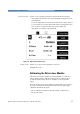
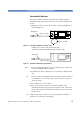
3 Move to [RLref], press [Edit]. Make sure that the displayed value of
<RLref> is correct. If it is not, move to [RLref], press [Edit], set the
value the return loss value of the reference cable you are using, then
press [OK].
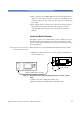
4 Press [Menu]. Move to <Reflectance calibration> and press Enter.
The instrument measures the power reflected by the reference
cable. The [RL] value changes to the same value as entered for
[RLref].
Front Panel Delta Calibration
For higher accuracy we recommend that you also calibrate for Front
Panel Delta. This is the difference between the insertion loss of the
reference cable, and the insertion loss of the patchcord used for return
loss measurement.
Measuring the Power Transmitted
through the Reference Cable
First, measure the power tramsmitted through the Reference Cable.
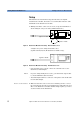
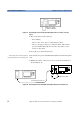
1 Making sure all the connectors are clean, set up the instrument as
shown in Figure 18
Figure 18 Measuring the Power Transmitted through the Reference Cable - External
Source
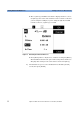
or Figure 19 if you are using an internal source
(Agilent 81611A/2A/3A/4A Return Loss modules only).
Agilent 81610CC Reference Cable
Power
Sensor
8163A Lightwave Multimeter
8161x 8163A Lightwave MultimeterLaser
Source
Agilent 81113PC